Showing posts with label electronic publishing. Show all posts

Thursday, May 13, 2010

Why oh whyyyyy? The New York Times Editors’ Choice iPad app

I know a lot of people have already expressed their disappointment with this app, but the bits I've read have focused on the content: the fact that the app only contains a selection of articles from the paper (which is why it's called "Editors' Choice"). I wasn't thrilled about that, either. It's annoying that my iPod Touch app has more NYT content. But whatever. I can kind of understand the decision--I might not agree with it, but I can at least see a reason behind it. Also, a paid app is said to be forthcoming and if it's reasonably priced (not $20.00 a month!) I'll consider paying for it (but only if they address my concern below).

Here is where we get to the "Why oh whyyyyy?" part of my complaints:

Why oh whyyyyy have they taken away my ability to tweet stories? It makes no sense. Email as the only sharing option is downright archaic. Twitter and Facebook are by far my preferred ways to share articles (or blog posts). I find myself using this app less and less. Just last night I decided to give it another try, immediately found an article I wanted to share, became frustrated and gave up. And have obviously been stewing about it ever since.

Yes, I realize that I can go to their main website and tweet articles from there. I probably will end up doing just that (and deleting the app). But the app could actually be useful as (I think) it was intended: as a selection, a little snippet of the paper to read when you just have a few minutes (or are too lazy to read the whole thing). It just makes me angry that they came so close to making something useful then blew it by removing a key feature (and one that already exists! They didn't have to invent it or figure it out or anything! Gah).

Monday, February 8, 2010

E-books, pricing, availability, frustration, redux

Lifehacker has a poll up asking How Much Would You Pay for an E-Book? I chose the answer, "Like dead-tree books, it completely depends on the book." Sure, I like paying less for books, but I'm not stuck on the $9.99 price. The way I think about it is if it's a book that I would be willing to pay hardback prices for in print, I'm willing to pay more for the e-book. If it's something I'd read as mass market in print, I want to pay less. Other things that matter to me are quality (I hate to see a badly formatted e-book, no matter what I paid for it) and I'd love to be able to lend e-books.

The availability thing really annoys me, though. Here's what happens if a book that I want as a e-book isn't available in that format: I find one that is. And who knows if I will remember to check again later to see if that book is now available? There are a lot of books out there, and I want most of them. So you're going to make it harder for me to get yours? Fine. There are plenty of others.

My frustration with availability isn't just about publishers holding e-book releases of new titles. It's also very frustrating when a couple of titles in a series are available as e-books and the rest aren't. Please, publishers, pay attention to this sort of thing. If I like an author, I'll happily blaze through an entire series. But so many ridiculous obstacles get in my path. My advice:
  • somewhere, somehow, on your site (and within the books, whether print or e-) make it so that I can see the books in a series listed in order (and make it clear that they are listed in order).
  • make all of the titles in the series available in the same formats. And when moving to a new format (such as e-book), consider starting with the first one. I guess I could see why you'd want to publicize the new format for the latest one, but when you do it would be great if the previous titles were also available.
What do you think? Is it $9.99 or nothing for you? Any book-buying (e-book or print) pet peeves you'd care to share?

Monday, July 20, 2009

Ebook Reader Roundup, part 1: Devices

Let's start by looking at the dedicated reading devices . . .

Kindle 1: Here is my original Kindle review. I’d also add that the more I think about it, the more I am opposed to carrying an extra device just for books. It says a lot about the coolness factor of the iPod Touch that I’m willing to carry an extra thing around (and I know that it is a multi-purpose device—I just happen to use it primarily for books). It also helps that it is very small.


Sony Reader: I’ve only ever seen one and I didn’t really read anything on it, but I flipped through a book on it. From what I could tell, though, it has many of the drawbacks of the Kindle. Primarily, to me, the fact that it’s only good for reading.

However, I could see my parents using something like a Kindle or Sony Reader. Particularly my dad: he likes to read newspapers (currently reads some online, some in paper) and books and mainly does so at home.

Time for some multi-purpose devices . . .

Palm Treo: I have been reading on my Treo for years. My current one is a 700p (I'm looking to upgrade, but can't pull the trigger on the Pre yet). The biggest selling point for this approach is that I always have a book with me, because I always have my phone with me. Since the eReader mobile site launched, I don't even need my computer—I can purchase and download directly to my phone. The downsides are the very small screen (which doesn't bother me, but I know it matters to many people) and the poor text resolution (which I didn't notice until I started reading on the iPod, but I'm getting ahead of myself).


iPod Touch: My new favorite thing—so pretty, so shiny. As I just mentioned, the screen on this thing is just gorgeous: it's big and both text and images look great on it. Also, there are so many great books and book apps available for the iPod/iPhone—and many of them are free! Makes my little heart flutter just thinking about it. By far my favorite reading device to date. It's also great for social networking (I use the Facebook and Tweetdeck apps), and the browser is quite nice. But are there any downsides? Yes. For one, I'm at the mercy of wifi availability since I have an iPod and not an iPhone. Also, (again, since it's not the iPhone) it's an extra thing to carry around.


Coming soon . . .
Ebook Reader Roundup, part 2: Apps

Sunday, March 29, 2009

The Willa Cather Archive

The Willa Cather Archive is another Nebraska Press/UNL Libraries collaboration (in partnership with the Cather Project). My favorite parts of this site are Cather's journalism and the image gallery.
The project originated in 1997, and over the years has digitized and published hundreds of thousands of words of Cather-authored texts and Cather scholarship. It now includes, in a fully-searchable format, digital transcriptions of eight Cather books (copyright law forbids digitally republishing her post-1922 works); all of her short fiction pre-1912, many of which are presented in their original periodical publications; her interviews, speeches, and public letters; her uncollected periodical nonfiction from the 1910s; the first five volumes of Cather Studies; the back issues of Teaching Cather; a large, searchable gallery of photographs; multiple biographies; announcements and news from the Cather scholarly community, virtual tours of Cather-related locales, and much more. Recent additions include A Calendar of the Letters of Willa Cather: An Expanded, Digital Edition; text analysis of Cather's complete fiction, powered by TokenX; and "Mapping a Writer's World: A Geographic Chronology of the Life of Willa Cather."

Wednesday, March 18, 2009

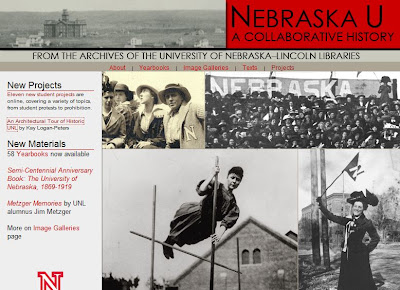
Nebraska U: A Collaborative History

This is another cool electronic project from UNL Libraries:
From the Archives of the UNL Libraries, Nebraska U is a collaborative effort to explore, through student research projects and multimedia, the history of Nebraska's most important University.
It includes An Architectural Tour of Historic UNL, a project from architecture librarian Kay Logan-Peters.
This website illustrates with text and images the dramatic physical development of Nebraska's largest academic institution, the University of Nebraska, and the people who committed their lives to it. This website is devoted in particular to the growth of the Lincoln campuses, now known as City and East.

Much of the information contained in this site is available elsewhere, but it requires a determined researcher to track down the parts that make up the whole. Architectural records are contained at the University's Facilities Management department, other records are held within various files in the University Archives, embedded within the Board of Regents minutes, and scattered throughout various publications touching on the history of Lincoln and the University. Nearly all of this data is in print, that is, on paper. The intention of this work is to bring this vast amount of information together into an electronic publication, interpret and present it in a way that makes it meaningful, and deliver it to the researcher or casual reader in an easily accessible form. The remarkable history of the University of Nebraska deserves nothing less.

Wednesday, March 11, 2009

The Journals of Lewis & Clark Online

I was fortunate enough to have been part of the project team that created The Journals of the Lewis and Clark Expedition online. On this site you can browse the full text of the Nebraska edition of Lewis and Clark's journals.
Also included are a gallery of images, important supplemental texts, and audio files of selected passages plus Native American perspectives. With a focus on full-text searchability and ease of navigation, the Journals of the Lewis and Clark Expedition Online is intended to be both a useful tool for scholars and an engaging website for the general public.
Over the course of the implementation phase we uploaded about 200 pages a month. In a nutshell, this was our workflow:
  • obtain electronic file for the current volume (either from UNP's archive, from one of our vendors' archives, or by having it rekeyed)
  • send file to UNL Libraries Electronic Text Center for XML coding
  • a printout of the XML file with stylesheet applied comes back to UNP where it is proofread side-by-side with the print edition—not an easy task considering all of the journalists' creative spelling was retained
  • the marked-up hard copy goes back to E-Text where changes are incorporated into the XML file and any other necessary changes are made by UNP to the live site: menu revised, links added, etc.
  • the new pages go live

Monday, March 9, 2009

Catching Up: A Random List


I'm way behind here, so I'm just going to post a quick list to get caught up:
  • I read both Slip of the Knife by Denise Mina and Hardly Knew Her by Laura Lippman (go to the bottom of this entry to browse inside Hardly Knew Her). No surprise, I very much liked them both.
  • Lots of Kindle news: The Kindle 2 came out and here a friend describes his experience with it; there is now a Kindle app for the iPhone; and, of course, that whole text to speech brouhaha.
  • Barnes & Noble bought Fictionwise, and so also eReader. Will this mean more ebooks available for Jana? Let's hope so.
  • Some friends recommended the book Cloud Atlas by David Mitchell. I still need to get it, but I'm hoping once I do that it gets me out of my mystery rut. Here is a brief description:
A reluctant voyager crossing the Pacific in 1850; a disinherited composer blagging a precarious livelihood in between-the-wars Belgium; a high-minded journalist in Governor Reagan's California; a vanity publisher fleeing his gangland creditors; a genetically modified "dinery server" on death-row; and Zachry, a young Pacific Islander witnessing the nightfall of science and civilization — the narrators of Cloud Atlas hear each other's echoes down the corridor of history, and their destinies are changed in ways great and small.

In his captivating third novel, David Mitchell erases the boundaries of language, genre and time to offer a meditation on humanity's dangerous will to power, and where it may lead us.

Saturday, March 7, 2009

The New York Times Article Skimmer

This is the first example of an online newspaper that I'm excited about. I think they did a really good job recreating the experience of browsing through a paper. Here is a brief video showing article skimmer's features and navigation—it's really simple so it was easy to keep the video short.


By the way, this was my first screencast. I used ScreenToaster, a free web-based screen recorder (that I found via Lifehacker). It was easy to use and didn't require any software installation on my part.